Actualizado el
Tech Stack for AI Apps on iOS 2026: MLX vs CoreML - Complete Guide
Tech Stack for AI Apps on iOS 2026: MLX vs CoreML
TL;DR: For on-device AI apps on iOS in 2026, MLX Swift offers superior performance and better LLM support, while CoreML remains the option for classic models and older devices. In this post I explain why I chose MLX + SwiftUI + SwiftData to create a 100% offline AI assistant, and share the complete decision process.
Table of Contents
- Introduction: Why This Post
- My Personal Experience
- The Context: On-Device AI in 2026
- MLX vs CoreML: Complete Comparison
- My Choice and Why
- The Complete Stack
- Hardware Requirements
- Project Structure
- Initial Setup
- Architectural Decisions
- Resources and Next Step
Introduction: Why This Post
I’m publicly documenting the creation of an AI app that will work 100% offline. No servers, no third-party APIs, no data leaving your device.
This is Week 1 of the project and it’s worth starting by explaining the most important decision: what technologies to use?
I spent several days researching and found a problem (which we can say isn’t too serious either): updated information for 2026 is scarce. Most tutorials:
- Are outdated (use iOS 17 or earlier)
- Assume you’re going to use a cloud API
- Don’t compare (in most cases) the real options for on-device LLMs
- Ignore the latest MLX Swift updates
This post is the resource I wish I had found. If you’re considering creating an app with local AI on iOS, this will save you days of research. At least for now.
My Personal Experience
I come from the world of Python and data science (and long before that, from hard engineering). I had touched Swift and Xcode before this project, but I had never given it a complete framework nor had a clear idea of using it. My experience with iOS was limited to being a user (I’m fascinated by the Apple ecosystem).
If you want a bit more background, I recommend going to my “About Me” section.
Why This Project
Actually for several reasons. The main one is that I would love to have a 100% offline assistant to help me with my daily tasks. Using Claude, Gemini or ChatGPT requires being connected to the internet, which makes it less flexible in some cases. The secondary one, and no less important, is that not everyone wants to hand over their data to third parties so they can use AI. I personally don’t feel comfortable with this. And third (and several variants of this last one) is that I’m fascinated by new challenges and seeing how quickly I adapt.
My Current Level
I’m completely new to iOS development. I know programming using Python and have used some Django for web, but Swift is unknown territory. This project is as much about creating the app as it is about documenting my learning in the use of AI/ML (ah… I have a specialty but I applied it very little).
The Context: On-Device AI in 2026
Why Now Is Different
From what I could find researching, 3 years ago, running an LLM on an iPhone was science fiction. The models were too large, devices didn’t have enough memory, and performance was unacceptable.
In 2026, everything changed:
| Factor | 2023 | 2026 |
|---|---|---|
| Useful small models | Limited | Qwen2.5, Phi-4, Gemma 2 |
| iPhone RAM | 6GB (Pro) | >8GB |
| Apple ML Framework | CoreML (limited for LLMs) | Mature MLX Swift |
| Quantization | Experimental | 4-bit standard |
| Tokens/second | ~5 t/s | ~30 t/s |
The New Paradigm
Models with 1-3 billion parameters in 2026 are surprisingly good:
- Qwen2.5-3B: Coherent responses, decent reasoning
- Phi-4-mini: Excellent for code and logic
- Gemma 2 2B: Good size/quality balance
And the best part: they fit on a modern iPhone. Let’s look at one of these as an example:
Qwen2.5-3B model in 4-bit:
├── Disk size: ~1.8 GB
├── RAM usage: ~2.5 GB
├── Speed: ~25-35 tokens/second (iPhone 16 Pro)
└── Quality: Comparable to GPT-3.5 for many tasks
The Problem with Cloud Alternatives
| Service | Price | Privacy | Offline |
|---|---|---|---|
| ChatGPT Plus | $20/month | Data on servers | No |
| Claude Pro | $20/month | Data on servers | No |
| Gemini Advanced | $20/month | Data on servers | No |
| Local App | Much lower | 100% local | Yes |
MLX vs CoreML: Complete Comparison
This is the most important decision of the project. Let’s dive deep.
CoreML: The Veteran
 Core ML is an official Apple framework for Machine Learning, available since iOS 11 (2017).
CoreML Strengths
✅ Universal compatibility
   └── Works on iPhones since 6s
   └── Doesn't require Apple Silicon

✅ Native integration
   └── Vision framework (images)
   └── Natural Language (text)
   └── Sound Analysis (audio)

✅ Maturity
   └── 9 years of development
   └── Extensive documentation
   └── Established community

✅ Classic models
   └── Image classification
   └── Object detection
   └── Sentiment analysis
CoreML Weaknesses
❌ Limited LLM support
   └── Not designed for large transformers
   └── Problematic model conversion
   └── Inefficient KV-cache

❌ LLM performance
   └── ~8-12 tokens/second typical
   └── High memory consumption
   └── High initial latency

❌ Model ecosystem
   └── Few pre-converted LLMs
   └── Complex manual conversion
   └── Frequent conversion errors
MLX: The Specialist

MLX is an open-source Apple framework (launched December 2023), designed specifically for Apple Silicon.
MLX Strengths
✅ Optimized for LLMs
   └── Transformer-first architecture
   └── Efficient KV-cache
   └── Lazy evaluation

✅ Superior performance
   └── ~30-50 tokens/second
   └── Efficient use of unified memory
   └── Metal optimized

✅ Familiar API
   └── Similar to PyTorch/NumPy
   └── Smooth learning curve
   └── Excellent for prototyping

✅ Active ecosystem
   └── mlx-community on Hugging Face
   └── Hundreds of pre-converted models
   └── Frequent updates
MLX Weaknesses
❌ Apple Silicon requirement
   └── Doesn't work on Intel Macs
   └── Doesn't work on older iPhones
   └── Limits potential audience

❌ Relatively new
   └── 2 years vs 9 for CoreML
   └── Fewer tutorials available
   └── API may change

❌ Less native integration
   └── No Vision/NL equivalents
   └── Requires more manual code
My Choice and Why
I chose MLX Swift for this project. Here’s my reasoning:
1. The Main Use Case Is LLMs
My app needs to generate conversational text. MLX is designed exactly for this (among other things).
2. Performance Matters For UX
The difference between 10 t/s and 35 t/s is the difference between a frustrating app and a usable app.
I don’t think users want to wait 20 seconds.
3. The Model Ecosystem
With MLX, I can do this:
# Loading a model is ONE line
from mlx_lm import load, generate

model, tokenizer = load("mlx-community/Qwen2.5-3B-Instruct-4bit")
With CoreML, I need to:
- Find the model in compatible format
- Convert it manually (may fail)
- Optimize it for the device
- Pray it works
The friction is enormous.
4. Hardware Requirements Are Acceptable
Yes, MLX limits the audience to devices with Apple Silicon. But:
- iPhone 15 Pro and later have 8GB of RAM
- All Macs since 2020 have M1+
- Users who want local AI have modern hardware
It’s a pretty acceptable trade-off.
5. Apple Is Betting on MLX
The MLX team at Apple is active. There are frequent releases. The framework is constantly improving.
CoreML for LLMs… not so much.
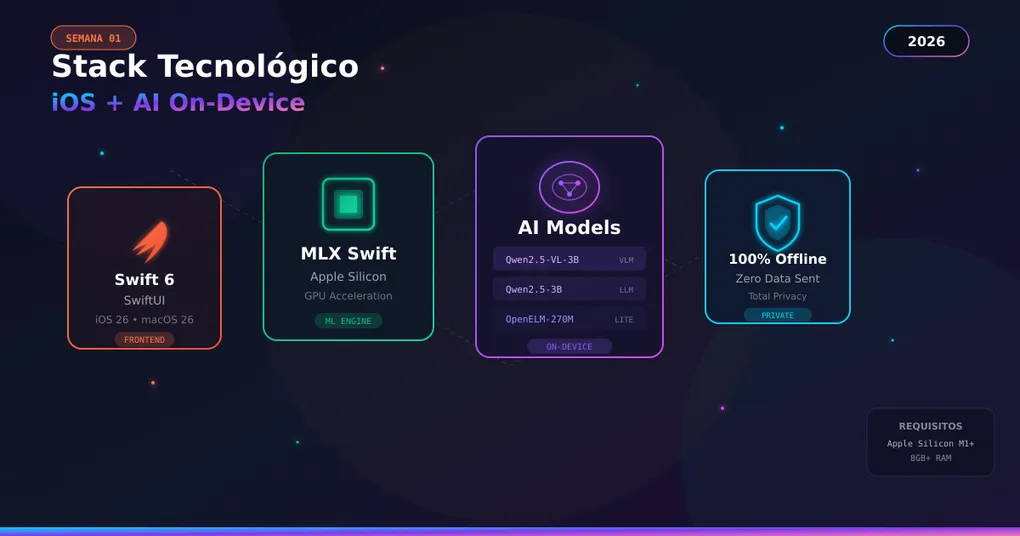
The Complete Stack
After evaluating all options, this is my final stack:

- Language: Swift 6
- Platform: iOS 26
- UI: SwiftUI
- State Management: @Observable
- Persistence: SwiftData
- LLM: MLX Swift
- Models: mlx-community — small or tiny
- Hardware: Apple Silicon
Justification for Each Component
SwiftUI (UI Framework)
Why SwiftUI and not UIKit:
| Aspect | UIKit | SwiftUI |
|---|---|---|
| Paradigm | Imperative | Declarative |
| Code needed | More | Less |
| Previews | Limited | Excellent |
| State | Manual | Automatic |
| Learning curve | High | Medium |
| Future | Maintenance | Active development |
SwiftUI in 2026 is mature. The problems of previous versions are solved. It’s the obvious choice for new projects.
// Example: A chat message in SwiftUI
struct MessageBubble: View {
    let message: Message

    var body: some View {
        HStack {
            if message.isUser { Spacer() }

            Text(message.content)
                .padding()
                .background(message.isUser ? .blue : .gray.opacity(0.2))
                .foregroundStyle(message.isUser ? .white : .primary)
                .clipShape(RoundedRectangle(cornerRadius: 16))

            if !message.isUser { Spacer() }
        }
    }
}
Swift 6 (Language)
Swift 6 brings strict concurrency checking by default. This means:
- Fewer concurrency bugs
- Safer code
- Better async/await integration
For an app that does ML inference in the background, this is critical.
SwiftData (Persistence)
Why SwiftData and not CoreData:
// CoreData (old)
@NSManaged var content: String?
@NSManaged var timestamp: Date?
@NSManaged var conversation: Conversation?

// SwiftData (modern)
@Model
class Message {
    var content: String
    var timestamp: Date
    var conversation: Conversation?
}
SwiftData is CoreData with a modern API. Less code, fewer errors, better integration with SwiftUI. I leave the links at the beginning so you can research in more detail.
@Observable (State Management)
Apple’s new Observation framework replaces @ObservableObject and @Published. Here’s an example of how it looks:
// Before (iOS 16)
class ChatViewModel: ObservableObject {
    @Published var messages: [Message] = []
    @Published var isLoading = false
}

// Now (iOS 26)
@Observable
class ChatViewModel {
    var messages: [Message] = []
    var isLoading = false
}
This will surely take me some learning time, but I think it’s the best option for the future. Especially coming from Python.
Hardware Requirements
Supported Devices
| Device | Minimum | Recommended | Optimal |
|---|---|---|---|
| iPhone | 15 Pro (8GB) | 16 Pro (8GB) | 16 Pro Max (12GB) |
| iPad | Pro M1 (8GB) | Pro M2 (8GB) | Pro M4 (16GB) |
| Mac | Air M1 (8GB) | Pro M2 (16GB) | Pro M3+ (18GB+) |
Impact on Audience
Devices with 8GB+ RAM (Apple Silicon):
├── iPhone 15 Pro / Pro Max (2023)
├── iPhone 16 / Pro / Pro Max (2024)
├── iPhone 17 series (2025)
├── All iPad Pro with M-chip
├── All Mac with M-chip
└── Estimated: ~30% of active iOS users

Trend: This percentage grows every year.Decision: Accept the limitation because the target segment (users who want local AI) has modern hardware. In a couple of years this will surely be more common.
Project Structure
MVVM Architecture
Basically because it’s a popular architecture and has a good initial learning curve. I leave here a reddit post because it’s good to start using it.
Why MVVM
| Benefit | Explanation |
|---|---|
| Separation of concerns | UI knows nothing about MLX, MLX knows nothing about UI |
| Testability | I can test ViewModels without UI |
| Reusability | A ViewModel can be used in multiple Views |
| Maintainability | Changing the UI doesn’t break the logic |
| Scalability | Easy to add features without refactoring everything |
Resources and Next Step
Official Documentation
| Resource | Link | What for |
|---|---|---|
| MLX Swift | GitHub | Main reference |
| MLX Examples | GitHub | Example code |
| SwiftUI | Apple Docs | UI documentation |
| SwiftData | Apple Docs | Persistence documentation |
Recommended Models (for now)
| Model | Size | Use | Link |
|---|---|---|---|
| Qwen2.5-0.5B-4bit | ~300MB | Free tier | HF |
| Qwen2.5-1.5B-4bit | ~900MB | Balance | HF |
| Qwen2.5-3B-4bit | ~1.8GB | Quality | HF |
Communities
- r/LocalLLaMA - Local LLMs community
- MLX Discord - Official MLX channel
- iOS Dev Weekly - iOS Newsletter
- HuggingFace - MLX models community on HuggingFace
Next Week
Week 2: Learning Swift
In the next post I’ll document my transition from Python to Swift. I’ll cover:
- Key differences between languages
- Optionals (the most confusing concept for beginners)
- Async/await in Swift vs Python
- Closures and higher-order functions
Conclusion
Choosing the tech stack is the most important decision of a project. For on-device AI apps on iOS in 2026, my recommendation is clear:
┌────────────────────────────────────────────────┐
│                                                │
│   MLX Swift + SwiftUI + SwiftData              │
│                                                │
│   If your app needs on-device LLMs,            │
│   this is the winning combination.             │
│                                                │
└────────────────────────────────────────────────┘
The trade-off (Apple Silicon only) is acceptable because:
- Performance is 3-4x better
- The model ecosystem is superior
- The target audience has modern hardware
- Apple is actively investing in MLX
Did this post help you? I’m documenting the entire process of creating this app. Follow me on YouTube for the weekly DevLog.